
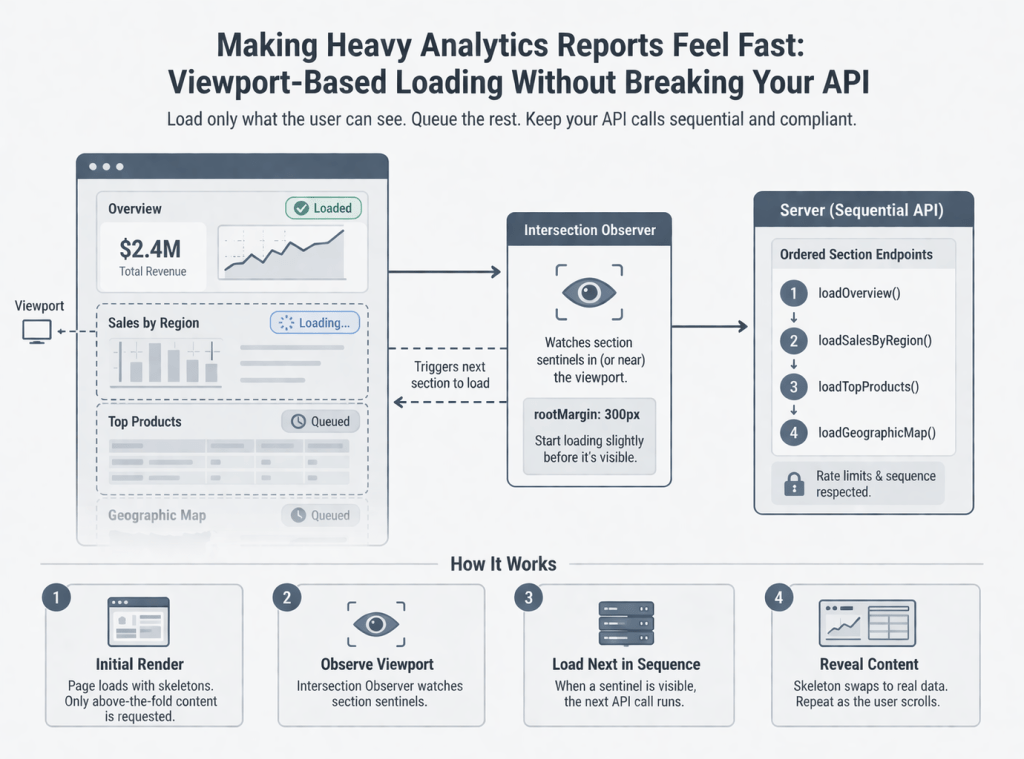
When a “report” page fires twenty-plus API calls on load, users wait on a blank screen or a single spinner. When those calls must stay sequential (rate limits, OAuth quotas, or backend constraints), you cannot simply parallelize everything. You can still give fast feedback and progressive content by loading only what the user can see—and queuing the rest until they scroll there.
This post describes a pragmatic approach we used in a server-rendered enterprise app (think JSF + PrimeFaces and remote commands; the ideas port to any stack with partial updates and lazy endpoints).
The problem
- Many sections per report: overview metrics, charts, tables, maps.
- Long-running or throttled APIs: sequential chains to avoid 429s or to respect upstream limits.
- Legacy-friendly stack: full page render + AJAX “remote commands,” not a pure SPA bundle.
The old pattern was predictable: trigger the full chain on first paint. Users saw the header quickly, but everything below stayed loading until the entire queue finished—or worse, the browser felt frozen while the DOM rendered huge tables and charts nobody had scrolled to yet.
We wanted:
- Skeletons and partial content quickly for what’s on screen.
- No change to the server’s safe ordering of API calls.
- No “load everything in the background anyway”—true deferral until a section is near the viewport.
The idea (game-engine intuition, web edition)
Games use visibility and distance to decide what to simulate or draw. For a report, the analog is:
- Only request data for a section when its placeholder is in (or near) the viewport.
That is not lazy-loading static images; it is deferring expensive server work until the user signal (scroll position) says the work is relevant.
Architecture at a glance
Two moving parts work together:
1. Server: one remote action per “section”
Break the monolithic “load all report data” flow into named operations (e.g. one per chart block or logical batch). Each operation:
- Calls the same APIs you already trust.
- Updates only the facelet fragment (panel) for that section.
- Sets a “loaded” flag so the UI can swap skeleton → real content.
You keep one ordered chain on the client: step n+1 runs only after step n completes and the next section’s sentinel is considered visible. That preserves rate-limit discipline while still not starting work for far-below-the-fold blocks.
2. Client: Intersection Observer + a small coordinator
- Put a stable DOM id on each section’s wrapper (or a dedicated sentinel node). Critical detail: the sentinel must exist on first paint. If your lazy block is wrapped in
rendered="#{alreadyLoaded}", the observer never attaches—fix by observing a parent that is always rendered (we learned this the hard way with a map panel). - Use
IntersectionObserverwith a modestrootMargin(e.g. 200–400px) so data starts loading slightly before the user lands on the section—feels instantaneous. - Optionally duplicate the “is it visible?” check with
getBoundingClientRect()when a step completes. Observers can batch late; a direct geometry check avoids a stuck chain when the user is already scrolled to the next block.
Coordinator rules:
nextIndex: which server step is allowed to run next.- On each successful AJAX completion: increment index, then maybe trigger the next remote command if that step’s sentinel is in range.
- On observer callback: same maybe → run next allowed step.
Expose one global hook for your framework’s oncomplete (e.g. window.reportViewportOnStepComplete()), and point every sequential remote command at it instead of hard-coding “call the next function by name.”
UX: skeletons, not spinners everywhere
Per-section skeleton placeholders (shimmer blocks, chart-shaped gray areas) train users to expect progressive loading. They also make layout stable so Observers and charts don’t reflow wildly when data arrives.
Pitfalls we hit (so you don’t have to)
- Sentinel inside conditional render
If the observer’s target is not in the DOM until data exists, nothing ever loads. Observe a wrapper that is always present. - Dialogs and included fragments
Full-page views that ship hidden dialogs still evaluate EL during render. Guard getters with null checks or gate whole dialogs behind “profile/overview loaded” flags—the first paint before any API response must not assume populated models. - Maps and third-party widgets after AJAX
Inline scripts in replaced markup may not run reliably, or may run before layout. Preferoncomplete+setTimeout+invalidateSize()(Leaflet, many chart libs) so the widget measures a real box. - Rate limits vs. perceived speed
You did not remove the queue; you gated it. First meaningful paint improves; total work across a full scroll may be similar. The win is time-to-first-value and lower burst load for users who never scroll the whole report.
What we didn’t do (and why)
- We did not replace the report with a full client-side router bundle for this iteration—the cost was too high for the problem size.
- We did not parallelize against a documented sequential contract with the API—compliance mattered more than theoretical throughput.
Results (qualitative—you can mirror with your metrics)
- Users reported the page “feels responsive” because the top of the report populates first.
- Support tickets about “frozen report” and “nothing happens for a minute” dropped because something always moves—skeletons + first sections.
- Engineering kept one clear loading contract with backends: same endpoints, same order when the user actually reaches each block.
When you publish numbers, pair time-to-first-interactive section and 90th percentile scroll depth; hiring managers like engineers who think in both UX and measurement.
Porting to your stack
| This approach | You might use |
|---|---|
Remote commands + update | tRPC batched routes, GraphQL field resolvers, REST + HTMX swap, React Query with enabled + ref observers |
oncomplete hook | Mutation observer, route transitions, TanStack Query onSuccess chaining |
Facelets rendered | Conditional rendering + suspense boundaries |
The pattern—visible gate + ordered steps + stable sentinels—is framework-agnostic.
Closing
Viewport-based loading is not magic; it is disciplined deferral plus honest feedback. If your report is long and your APIs are picky about how fast you hit them, teaching the UI to load like a game engine loads the world—only what the player can see—is one of the highest leverage changes you can ship without rewriting the backend.
 Ayush Raj
Leave a comment